Masters in Data Science applied to agricultural and food sciences, environment, and forestry engineering.
Instructor: Manuel Campagnolo (mlc@isa.ulisboa.pt)
Teaching assistant: Hannah Nathanson (hnathanson@edu.ulisboa.pt)
Revised class schedule: class (Friday, room 48) will start at 11:45 and end at 14:45, with a ~45 minute break for lunch.
* You need to self-register for the course in Moodle at <https://elearning.ulisboa.pt/user/index.php?id=12863>. The Moodle site allows you to access assignments; submissions; detailed grades and comments * If you don't have one already, create a GitHub account at <https://github.com/signup> * [CS50P: CS50’s Introduction to Programming with Python](https://cs50.harvard.edu/python). Lectures (videos and notes), problems sets, shorts; * [CS50 codespace](https://cs50.dev/). VScode codespace that allows you to use a customized AI bot (CS50's duck debugger, or DDB for short) and test your solutions for CS50P proposed problems (you can access the codespace with your GitHub user). * [Python tutor](https://pythontutor.com/). Python Tutor is a online tool that lets you write code in a web browser and see what happens step-by-step as the computer runs it. * [Fenix webpage for the course](https://fenix.isa.ulisboa.pt/courses/intpy-564938523285845): administrative information and final grades * [Help me](https://1drv.ms/o/c/0bedfe7ffa5a0eb8/IgA-CgpLN8IVTJsDg9FJ9m67AQrx95SYxoXvGRBOMDVRwjI): general help, assignements</details> ---Advanced exercises, alternative tutorials and reference materials
- Codewars is an online educational platform used to practice, improve, and master programming skills through gamified coding challenges in Python and many other programming languages. You can log in with your GitHub account and choose your proficiency level. Codewars will propose exercises for your level.
- Learn Python with Scrimba, Olof Paulson: interactive lectures (videos), examples and exercises
- Introduction to Python (VScode): interactive step by step lectures and exercises, real-time quizzes.
- Basic concepts and features of the Python language and system: The Python Tutorial at python.org.
- Python Programming course at PP.fi: same features as CS50 but to test your solutions to problems you are required to pass previous tests
- If you curious about the story of Python, check out this video. In this video, you’ll learn about the output of
>>> import thisand many other anecdotes about Python.</blockquote>
---
Class 1 (September 11, 2026): data types, variables, lists, functions
1. The recommendation for this class is to code using the CS50 codespace. Two steps: 1. log in into your GitHub account; 2. access your code space at <https://cs50.dev/>. This environment allows you to test automatically your scripts for the CS50 problem sets and gives access to a customized AI bot (DDB) 2. Some useful keyworks for the command line interface (CLI): * `code filename.py` to create a new file * `ls` to list files in folder * `cp filename newfilename` to copy a file, e.g. `cp ..\hello.py farewell.py` (`..` represents parent folder) * `mv filename newfilename` to rename or move file, e.g. `my farewell.py goodbye.py` or `mv farewell.py ..` (move one folder up) * `rm filename` to delete (remove) file * `mkdir foldername` to create new folder * `cd foldername` change directory, e.g. `cd ..` * `rmdir foldername` to delete folder * `clear` to clear terminal window 3. Typing `python` gives you access to a REPL (interactive Read-Eval-Print-Loop) environment (<https://realpython.com/interacting-with-python/>). 4. All values in Python have a **type**. The **primitive data types** are: integer, float, string, Boolean, and None (see <https://www.geeksforgeeks.org/python/primitive-data-types-vs-non-primitive-data-types-in-python/>). There are also **Non-Primitive Data Types** like `list`, `tuple`, `set` and `dictionary`. * strings (`str`), variables, print (a function), parameters (e.g. `end=`), input, comments, formatted strings (`f"..."`), `.strip()`, `.title` (methods) * integers (`int`), operations for integers, casting (e.g. `str` to `int`) * floating point values (`float`), round, format floats (e.g. `f"{z:.2f}`) * Boolean: `True`, `False`, that can be combined with operators `and`, `or`, `not` 5. Functions, `def`, `return`. Example: ``` def square(x): return x*x ``` 6. View the step-by-step execution of this code on [Python Tutor](https://pythontutor.com/visualize.html#code=def%20main%28%29%3A%0A%20%20%20%20x%3D4%0A%20%20%20%20y%3Dsquare%28x%29%0A%20%20%20%20print%28f%22%7Bx%7D%20squared%20is%20%7By%7D%22%29%0A%0Adef%20square%28n%29%3A%0A%20%20%20%20s%3Dn*n%0A%20%20%20%20return%28s%29%0A%0Amain%28%29&curInstr=12&mode=display&origin=opt-frontend.js&py=311). Identify the scope of the variables. Try to add `print(s)` in line 4 after calling function `square` inside the `main` function: why do you get a `NameError`? 7. Suggested problems: [CS50 Problem set 0](https://cs50.harvard.edu/python/psets/0/). Find a solution to the problems at your CS50 codespace, and dialog with the AI bot (DDB) for help. The bot won't produce code but will help you by answering your to questions: very precise prompts originate more details in the answers. Resist the temptation of looking for a solution on the web or using a generic AI bot.---
Class 2 (September 18, 2026): conditionals, lists, dictionaries
1. See: - [notes on CS50P lecture 1](https://cs50.harvard.edu/python/notes/1/): conditionals `if`, `match`, boolean expressions, etc - [notes on CS50P lecture 2](https://cs50.harvard.edu/python/weeks/2/): `for` and `while` loops, etc 3. Conditionals: - `if`, `elif`, `else`: ```Python if score >= 70: print("Grade: C to A") elif score >= 60: print("Grade: D") else: print("Grade: F") ``` - `match`: ```Python match species: case 'versicolor': label=0 case 'virginica': label=1 case _: label=2 ``` 3. Pythonic coding: `def main()`, define other functions, call `main()`. The code must be modular. 4. While loops, for loops, `break`, `break` and `return` ``` s='intro to python' for i in range(15): print(s[i]) ``` ``` # require user to provide a positive number while True: n = int(input("What's n? ")) if n > 0: break ``` 6. Data type *list* `[]`: methods `append`, `extend` 7. Data type *dictionary* `{}`, `items()`, keys `.key()` and values `.values()` ```Python knights = {'gallahad': 'the pure', 'robin': 'the brave'} for k, v in knights.items(): print(k, v) if 'gallahad' in knights: print('Go Gallahad') ``` 8. Suggested problems: [CS50 Problem set 1](https://cs50.harvard.edu/python/2022/psets/): Deep Thought, Home Federal Savings Bank, Math Interpreter, Meal Time 9. Assignment #1 available on Moodle: problems [File extensions (set 1)](https://cs50.harvard.edu/python/2022/psets/1/extensions/), [Coke machine (set 2)](https://cs50.harvard.edu/python/2022/psets/2/coke/), [Plates (set 2)](https://cs50.harvard.edu/python/2022/psets/2/plates/)---
Class 3 (September 25, 2026): list and dictionary comprehensions, collaborative exercise
1. See lecture on [List and dictionary comprehensions](https://cs50.harvard.edu/python/shorts/list_dictionary_comprehensions/) 2. [Exercises on list comprehension (with some solutions)](/greends-ipython/docs/exercises_list_comprehension.html) 2. [Exercises on dictionary comprehension (with some solutions)](/greends-ipython/docs/exercises_dict_comprehension.html) 3. Collaborative project: each student or small group of students should define each necessary function to complete the script below. The side effect of `main()` is a simple histogram printed in the terminal. ```Python from read_values import read_values from determine_min_max import determine_min_max from number_of_classes_sturges import number_of_classes_sturges from amplitude import amplitude from determine_frequency import determine_frequency from print_frequency import print_frequency def main(): # read values x=read_values() # x is a list of numbers, either integers or floats n=len(x) # integer; number of values # determine min value and max value xmin,xmax=determine_min_max(x) # integers or floats # determine number of classes m=number_of_classes_sturges(n) # m is a positive integer such that 2**(m-1) <= n <= 2**m # determine class amplitude delta=amplitude(xmin,xmax,m) # positive float, the range of values divided by the number of classes # Compute frequency for each class and plot histogram row by row for i in range(m): left=xmin+i*delta if i < m-1: right=left+delta else: right=left+delta+1 # either 1 or any positive value freq=determine_frequency(x,left,right) # integer; note that each value must belong to one and only one class print_frequency(freq) # the output must be '****' where each * represents one observation # execute main main() ``` --- To share code, students should submit a *pull request* on GitHub. Test how to perform a pull request with a trivial `run()` function for each team: ```text 1. Fork the course repository `https://github.com/isa-ulisboa/greends-ipython` on your GitHub account 2. In your fork, go to `collaborative_proj/submissions/`. 3. Create a file called `team_name.py` with your own team name, say `team_01.py` 4. Add a `run()` function to the file with contents like `print('team 1')` 5. Commit the file. 6. Click Contribute → Open pull request. 7. Make sure it goes from your fork to the teacher’s original repository `https://github.com/isa-ulisboa/greends-ipython` 8. Click `Create pull request`. ```---
Class 4 (October 2, 2026): handling exceptions in Python: catching and raising exceptions
See CS50P lecture 3, in particular the short on handling exceptions:
try,except,ValueError,KeyError.A few examples of code that can be helpful to solve problems in CS50 Problem set 3.
Example of basic use of `try-except` to catch a `ValueError`: ``` try: x = int(input("What's x?")) except ValueError: print("x is not an integer") else: print(f"x is {x}") ``` Function for requesting an integer from the user until no exceptions are caught: ``` def get_int(): while True: try: x = int(input("What's x?")) except ValueError: print("x is not an integer") else: break return x ``` For a list of Python Built-in Exceptions, besides `ValueError`, you can check https://www.w3schools.com/python/python_ref_exceptions.asp
- The fuel gauge problem (https://cs50.harvard.edu/python/2022/psets/3/fuel/)
To solve this problem, try to organize your code as follows. As suggested in *hints*, you should catch `ValueError` and `ZeroDivisionError` exceptions in your code. In the code below, the user is being asked for correct values for `x,y` until they satisfy the requirements: `x,y` must be inputted as a string `x/y`, `x` has to be less or equal to `y`, and `y` cannot be zero. The function `get_string_of_integers_X_less_than_Y` in the code below should take care of that. ``` def main(): # asks user for input until the input is as expected x,y=get_string_of_integers_X_less_than_Y() # compute percentage from two integers p=compute_percentage(x,y) # print output print_gauge(p) ```Exercise: adapt the code proposed in the short to be more modular, where the main function is something like the one below: ``` def main(): spacecraft = input("Enter a spacecraft: ") au=get_au(spacecraft) m = convert(au) print(f"{m} m") ```
- Other useful applications of try-except
- We may want to exit the execution of our script if some exception is caught. This can be done with `sys.exit()`, which can also be used to print a message. ``` import sys # import module try: x = int(input("What's x?")) except ValueError: sys.exit("x is not an integer") ``` - Example of code that catches `CRTL-C` or `CRTL-D`: ``` while True: try: x=int(input()) except ValueError: print('x is not integer') except KeyboardInterrupt: #CTRL-C (in Linux, interrupt execution) print('\n KeyboardInterrupt') break except EOFError: #CTRL-D (in Linux, log out terminal/end-of-file) print('\n EOFError') break else: print(x) ```
- Exercise (Asking for an haphazard list of numbers): Create a program that asks the user to provide haphazardly a series of numbers that you want to store in a list. The user is asked for a number at the time. Only inputs that are numbers are stored in the list. When the user wants to stop, it should type CTRL-D. Then, the program should print the list of numbers.
---
Class 5 (October 9, 2026): modules, packages, APIs
See lecture https://cs50.harvard.edu/python/weeks/4/
Modules and packages
Suggestion: watch <https://cs50.harvard.edu/python/shorts/creating_modules_packages/> Modules are just python scripts (files like `module_name.py`) which can be imported into your main code and that can be shared between multiple applications. You can import everything that belongs to the module, or just some given function(s) or other objects.As explained on the recommended video, a python **package** is just a folder with modules and a special file named `__init__.py`Create and import your own module
Exercise: Create file named
utils.pyand filemain.pyin http://cs50.dev. Organize the files in the following folders:|--- class_5 # or whatever folder name you wish |--- common # General reusable code used across the project |--- __init__.py # optional: marks the folder as a package |--- utils.py |--- main.pyThe contents of
utils.pyare typically functions or constants that you can re-use in different contexts. Let’s suppose thatutils.pyhas the following contents.utils.py
import sys

Constants={
    'e'   : 2.718281828459045, # Euler's constant
    'pi'  : 3.141592653589793, # Archimedes' constant
    'phi' : 1.618033988749895  # Golden ratio
}

def get_integer() -> int:
    #get integer from user
    while True:
        try:
            return(int(input('Type a number:  ')))
        except ValueError:
            print('Not an integer number: try again')
        except KeyboardInterrupt: #CTRL-C
            print('\n If you want to exit type CTRL-D')
        except EOFError: # CTRL-D
            sys.exit('\n Exit as requested')
and
main.pyis the following file:main.py (1st version)
import common.utils

def main():
    x=common.utils.get_integer()
    print(x)

main()
Run
main.pyfrom inside theclass_5folder (cd class_5, thenpython main.py), so that Python can find thecommonfolder.If you prefer, you can explicitly import some given functions from the module as in the following example.
main.py (2nd version)
from  common.utils import get_integer

def main():
    x=get_integer()
    print(x)

main()
You can also import everything from the module with
from common.utils import *instead of the more specific (and recommended)from common.utils import get_integer.The examples above follow the directory tree that was suggested. If you change the module’s location, you need to adapt the code accordingly. In alternative, you can add the path to the directories where your modules lies to
sys.pathas in the following example.import sys sys.path.append(r'path-to-folder') # folder that contains utils.py (e.g. `/workspaces/8834091/class_5/common`) import utilsPip install
Some modules, like
sys,mathorrandom, are part of the Python standard library: they come with Python and can be imported without installing anything. For instance,randomprovides a series of functions for sampling, shuffling, and extracting random numbers from a variety of probability distributions.Many other packages are available at the Python Package Index, https://pypi.org/. They need to be installed before they can be imported, which is done in the terminal with
pip. For instance, the packagerequests(used below to access APIs) is installed with$ pip install requestsand then imported in your script with
import requests. If you want to know the folder where a module is located, you can get that information with the attribute__file__, as in the following script. Compare the two folders: the standard library and the installed packages (site-packages) are in different places.import random import requests print(random.__file__) print(requests.__file__)Suggestion: write a script to estimate the value of $\pi$ with a Monte Carlo algorithm that makes calls to
random.uniform(-1, 1). One possible solution: https://www.geeksforgeeks.org/dsa/estimating-value-pi-using-monte-carlo/
sys.argvPreviously, we used module `sys`, in particular functions `sys.exit()` and `sys.path`. Another useful function is `sys.argv`, that allows you to have access to what the user typed in at the command line `$` as in the following script. ```Python import sys print(len(sys.argv)) # returns the number of words in the command line after $python print(sys.argv[1]) # returns the 2nd word, i.e., the first word after $python myscript.py ``` For instance, the following script named `sum.py` prints the sum of two numbers that were specified in the command line.To run it, you can for instance execute the command `$python sum.py 1.2 4.3` in the terminal.sum.py
# sum.py
import sys
try:
    x,y = float(sys.argv[1]), float(sys.argv[2])
    print('the sum is',x+y)
except IndexError:
    print('missing argument')
except ValueError:
    print('The arguments are not numbers')
- APIs
Suggestion: watch https://cs50.harvard.edu/python/shorts/api_calls/ (13') *Application program interfaces* allow you to communicate with a remote server. For instance, `requests` is a package that allows your program to behave as a web browser would. Consider the following script `myrequest.py` that allows you to explore the *itunes* database (https://performance-partners.apple.com/search-api):Example: iTunes
import requests
import sys
try:
    response = requests.get("https://itunes.apple.com/search?entity=song&limit=2&term=" + sys.argv[1])
    print(response.json())
except IndexError:
    sys.exit('Missing argument')
except requests.RequestException:
   sys.exit('Request failed')
You can then call the API from your terminal with
$python myrequest.py 'name of my favorite band'. What you see printed on the terminal is a dictionary. How can you edit your script such that the output is just a list of track names (keytrackName)? Notice that&limit=2in the search sets the number of songs that are returned by the API.Example: GBIF
You can easily adapt that code to access a different database. For instance if you want to explore the GBIF database https://data-blog.gbif.org/post/gbif-api-beginners-guide/, you can just replace the main line of code in
myrequest.pywithresponse=requests.get('https://api.gbif.org/v1/species/match?name='+ sys.argv[1])and execute it with, say,
$python myrequest.py Tracheophytain the terminal.Example: open-meteo
Another example of a useful API for weather data is https://open-meteo.com/en/docs#api_documentation. You can find a customized
requestspackage for open-meteo at https://pypi.org/project/openmeteo-requests/.import openmeteo_requests openmeteo = openmeteo_requests.Client() # Make sure all required weather variables are listed here # The order of variables in hourly or daily is important to assign them correctly below url = "https://api.open-meteo.com/v1/forecast" params = { "latitude": [38.74,41.15], # Lisbon, Porto "longitude": [-9.14,-8.6] , "current": ["temperature_2m", "relative_humidity_2m","wind_speed_10m"], } responses = openmeteo.weather_api(url, params=params) # Process first location. Add a for-loop for multiple locations or weather models for i in range(len(responses)): response = responses[i] print(f"Coordinates: {response.Latitude()}°N {response.Longitude()}°E") print(f"Elevation: {response.Elevation()} m") # Process current data. The order of variables needs to be the same as requested. current = response.Current() print(f"Current temperature_2m: {current.Variables(0).Value()}") print(f"Current relative_humidity_2m: {current.Variables(1).Value()}") print(f"Current wind_spreed_10m: {current.Variables(2).Value()}") print()
- Suggested problem
Solve problem *Bitcoin price index* from CS50P [Problem_set_4](https://cs50.harvard.edu/python/2022/psets/4/). In particular, organize your code so the main function is the following: ``` def main(): x=read_command_line_input() price=get_bitcoin_price() print(f"${x*price:,.4f}") ```
Class 6 (October 16, 2026): virtual environments; file I/O with images
- For virtual environments, watch How to Use Virtual Environments with the Built-In venv Module (17’) and see the official documentation https://docs.python.org/3/library/venv.html
- For file I/O and images with Pillow, see lecture https://cs50.harvard.edu/python/weeks/6/ (sections on
open,withand Binary Files and PIL). CSV files will be discussed later with Pandas.In this class we build a small project,
image_project, that downloads and processes images of leaves. First we prepare a virtual environment with the packages the project needs (requestsandPillow), then we use it to read and write text and image files. At the end of the class, the project folder should look like this:image_project/ <- all commands are run from here |--- .venv/ <- the virtual environment (created by python -m venv .venv; not shared) |--- .gitignore <- tells Git to ignore .venv/ |--- requirements.txt <- list of packages and versions (shared) |--- images/ <- input images |--- output/ <- files created by our scripts |--- notes.py |--- download_image.py |--- explore_image.py |--- process_images.py
1. Why virtual environments?
Suppose your script was written and tested with version 12.0.0 of Pillow, but a colleague has an older version installed that behaves differently, or another project of yours needs a different version. Installing every package in the same place (the base environment) quickly leads to conflicts. A virtual environment solves this problem. It is:
- A folder that contains a Python interpreter and a set of packages, with given versions, for one project. It is isolated from other virtual environments and from the packages installed in the base environment.
- Conventionally named
.venvand placed at the root of the project folder. Tools such as VS Code detect it automatically.- Disposable: it should be simple to delete and re-create it from scratch. You never place your scripts or data inside
.venv.- Not shared (e.g. not checked into Git) and not copied to another computer. Instead, one shares the list of packages (
requirements.txt) and each person re-creates the environment.Let’s first look at the base environment. The following commands list the installed packages and show information about the package
requests(version, location, dependencies):$ pip list $ pip show requestsThe commands below work in the CS50 codespace, which runs Linux. When a command is different in Windows, the Windows version is given in a comment.
2. Create and activate a virtual environment
- Create the project folder and move into it. From now on, all commands are executed from
image_project:$ mkdir image_project $ cd image_project- Create the virtual environment. This creates the folder
.venvinsideimage_project:image_project/ $ python -m venv .venvSince the name starts with a dot,
.venvis a hidden folder: usels -ato see it.- Activate the environment:
image_project/ $ source .venv/bin/activate # Windows: .venv\Scripts\activateThe prompt now starts with
(.venv), which shows that the environment is active: the commandspythonandpipnow refer to the Python and packages in.venv. To de-activate it, the command isdeactivate.- Check which Python is running and which packages are installed. A new environment has (almost) no packages:
(.venv) image_project/ $ python -c "import sys; print(sys.prefix)"
(.venv) image_project/ $ pip list
sys.prefixis the folder of the Python installation in use: it should be the.venvfolder of your project.3. Install packages and create requirements.txt
- With the environment active, install the packages for the project, specifying the versions:
(.venv) image_project/ $ pip install pillow==12.0.0 requests==2.32.5Packages that these depend on (e.g.
urllib3forrequests) are installed automatically. Compare the result ofpip listandpip show requestswith what you got in the base environment: the version and the location are different.- Check where Python looks for packages:
(.venv) image_project/ $ python -c "import sys; print(sys.path)"The
site-packagesfolder inside.venvis listed, but the folder where the base environment packages are stored is not.- Save the list of installed packages and versions to
requirements.txt, at the root of the project:(.venv) image_project/ $ pip freeze > requirements.txtOpen
requirements.txtto see its contents: one line per package, such aspillow==12.0.0.- Tell Git to ignore the
.venvfolder, by creating a file.gitignorewith the line.venv/:(.venv) image_project/ $ echo ".venv/" > .gitignoreIf you share the project (e.g. on GitHub), you share the scripts,
requirements.txtand.gitignore, but not.venv.4. Delete and re-create the environment
Since
.venvis disposable, we can delete it and re-create it fromrequirements.txt. This is also what a colleague does after downloading your project.(.venv) image_project/ $ deactivate image_project/ $ rm -rf .venv # Windows (PowerShell): Remove-Item -Recurse -Force .venv image_project/ $ python -m venv .venv image_project/ $ source .venv/bin/activate # Windows: .venv\Scripts\activate (.venv) image_project/ $ pip install -r requirements.txt (.venv) image_project/ $ pip listExercise: install one more package in your environment (say,
emoji), updaterequirements.txt, and send the file to a colleague. Your colleague should create a new project folder with a.venvenvironment from yourrequirements.txtand check withpip listthat both environments have the same packages and versions.5. Reading and writing text files
First, create the folders for the input and output files:
(.venv) image_project/ $ mkdir images outputIn this step we write a script
notes.py, in theimage_projectfolder, that writes some notes about the leaf to a text file and then reads them back. Add each piece of code below at the end ofnotes.py, and run the script after each addition with(.venv) image_project/ $ python notes.pyThen check the contents of
output/notes.txt(open it in the editor, or usecat output/notes.txtin the terminal).
openis a function built into Python that allows you to open a file to read from it or to write to it. The second argument is the mode:"w"(write),"a"(append) or"r"(read, the default). In the code below, the file is opened in writing mode: if the file already exists, its previous contents are deleted. This is why runningnotes.pyseveral times does not accumulate notes: each run starts with an empty file.# notes.py file = open("output/notes.txt", "w") file.write("olive leaf, upper surface dark green\n") file.close()Notice that
writedoes not add a new line: we need to include"\n"at the end of the string. To add new contents at the end of an existing file, open it in mode"a"(append) instead.Instead of explicitly opening and closing a file, it’s simpler and safer to use a context manager, with the keyword
with, which automatically closes the file at the end of the block, even if an error occurs. Add the following lines tonotes.py, which append a second note to the file:with open("output/notes.txt", "a") as f: f.write("olive leaf, lower surface silvery\n")To read the file, open it in mode
"r". The methodreadlinesreturns a list where each element is a line of the file (including the"\n"at the end). Add these lines tonotes.py, so the script prints what it wrote:with open("output/notes.txt", "r") as f: lines = f.readlines() print(lines)It is also possible to read the file one line at a time, which is better for large files. Add this last block to
notes.pyand compare its output with the previous one:with open("output/notes.txt", "r") as f: for line in f: print(line.rstrip()) # rstrip() removes the "\n" at the end of the line6. Binary files: downloading and inspecting an image
Files can be text files (human-readable, like
notes.txtor a.pyscript) or binary files, like images. Binary files are opened with the modes"rb"and"wb", and their contents arebytesinstead ofstr.The following script
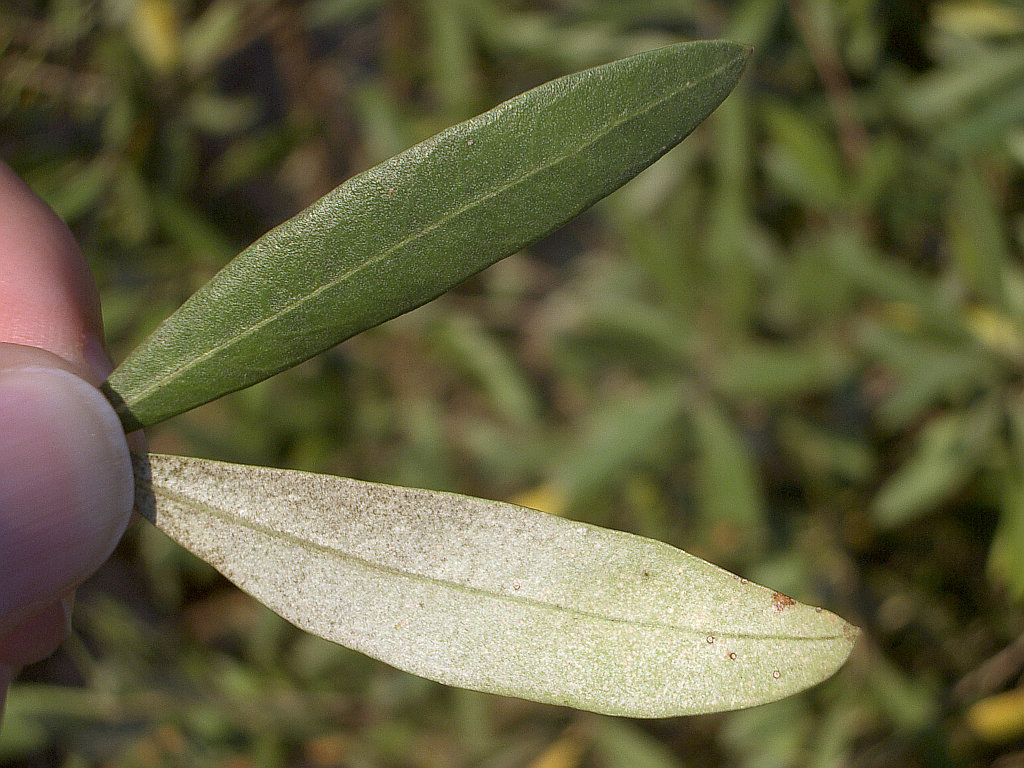
download_image.pydownloads a photo of an olive leaf (upper and lower surface) from Wikimedia Commons, using the packagerequests(see class 5). The image is inresponse.content, which is abytesobject, so the file is opened in mode"wb". Wikimedia Commons rejects requests without a descriptive User-Agent (the name of the program that makes the request), so we add one inheaders.# download_image.py import requests url = "https://upload.wikimedia.org/wikipedia/commons/b/b2/Olive-tree-leaf-0.jpg" headers = {"User-Agent": "greends-ipython-course/1.0"} response = requests.get(url, headers=headers) response.raise_for_status() # raises an exception if the download failed print(response.headers["Content-Type"], len(response.content), "bytes") with open("images/olive_leaf.jpg", "wb") as f: f.write(response.content)If the download fails, you can copy the same image from datasets/olive_leaf.jpg in this repository. (Photo: Rnbc at en.wikipedia, CC BY-SA 3.0, via Wikimedia Commons.)
The first bytes of a file usually identify its format. Let’s read the first 4 bytes of the image:
with open("images/olive_leaf.jpg", "rb") as f:
    first_bytes = f.read(4)
print(first_bytes) # b'\xff\xd8\xff\xe0'
All JPEG files start with
b'\xff\xd8', and all PNG files start withb'\x89PNG'. Try to open the image in text mode ("r") and see what happens.7. Images with Pillow
Reading the bytes of an image is not enough to work with its pixels: we need to decode the file format. The package
Pillow(imported asPIL) does that for many formats. The following scriptexplore_image.pyopens the image, prints its properties and saves three new images inoutput.# explore_image.py from PIL import Image with Image.open("images/olive_leaf.jpg") as img: print(img.format, img.size, img.mode) # JPEG (1024, 768) RGB # each pixel of an RGB image is a tuple (red, green, blue) with values between 0 and 255 print("upper surface:", img.getpixel((450, 220))) # (x, y) = (column, row), from the top-left corner print("lower surface:", img.getpixel((500, 580))) gray = img.convert("L") # "L" means grayscale: one value between 0 (black) and 255 (white) per pixel gray.save("output/olive_leaf_gray.png") # the format is given by the extension thumb = img.copy() thumb.thumbnail((256, 256)) # resizes in place, keeping the proportions thumb.save("output/olive_leaf_thumb.jpg") img.rotate(90, expand=True).save("output/olive_leaf_rotated.jpg")Questions:
- Which surface of the leaf is brighter? Compare the values of
gray.getpixel(...)at the same two points.- What is the size of the thumbnail? Why is it not
(256, 256)?- Check the first bytes of
output/olive_leaf_gray.pngas in step 6: is it a PNG file?8. Exercise: process a folder of images
Write a script
process_images.pythat creates a grayscale thumbnail of each image in a folder, and keeps a log of the processed files. The input and output folders are given in the command line (seesys.argvin class 5):(.venv) image_project/ $ python process_images.py images outputFor each image
name.jpg(or.jpeg,.png) inimages, the script savesoutput/name_thumb.pngand appends a linename.jpg -> output/name_thumb.pngto the fileoutput/log.txt. Other files in the folder are ignored. Add a few more leaf images toimagesto test it.Use the template below. The module
os(standard library) providesos.listdir(folder), which returns the list of file names in a folder,os.path.join(folder, name), which builds a path, andos.path.splitext(name), which splits a name such as"olive_leaf.jpg"into("olive_leaf", ".jpg").import os import sys from PIL import Image def main(): input_folder, output_folder = read_command_line() for file_name in os.listdir(input_folder): if is_image(file_name): input_path = os.path.join(input_folder, file_name) output_path = make_thumbnail(input_path, output_folder) write_log(output_folder, file_name, output_path) def read_command_line(): '''returns the input and output folders; exits with a usage message if they are missing''' ... def is_image(file_name): '''returns True if the extension of file_name is .jpg, .jpeg or .png (in lower or upper case)''' ... def make_thumbnail(input_path, output_folder, size=(256, 256)): '''saves a grayscale thumbnail of the image as a png file in output_folder and returns its path''' name = os.path.splitext(os.path.basename(input_path))[0] output_path = os.path.join(output_folder, name + "_thumb.png") ... return output_path def write_log(output_folder, file_name, output_path): '''appends the line "file_name -> output_path" to output_folder/log.txt''' ... main()Suggested problem: CS50 P-Shirt from CS50P Problem set 6.